السبت، 3 أكتوبر 2015

Supporting our young scientists through the Google Science Fair

Mariette DiChristina is the Editor in Chief and senior vice president of Scientific American—the first woman to hold the role in the magazine's 170-year history. She has been a Fellow of the American Association for the Advancement of Science since 2011 and served as president of the National Association of Science Writers in 2009 and 2010. She joins us here today to share her perspective on the Google Science Fair, which is in its fifth edition this year. -Ed.

This marks my fifth year with the Google Science Fair. In October 2010, when I had my first conversations with my friends at Google about their idea to create a global online science fair that any kid 13–18 could participate in, I thought it sounded pretty cool. But I couldn’t then imagine just how inspiring and powerful such a competition would turn out to be in reality.

At the time, I hadn’t even been editor in chief of Scientific American for a year, but I had real ambitions to try to do something to make a difference in educating our young people about science. You see, I believe that science is the engine of human prosperity—it’s the way we grapple with some of the world’s most challenging problems, from cures for diseases to living sustainably in a finite world. So I’ve always seen the idea of fostering evidence-based thinking in our next generation of global citizens as vital.

Now, five years later and working with partners LEGO Education, National Geographicand Virgin Galactic, the Google Science Fair has an impressive track record of enabling our world’s young scientists to shine. Over the years, they’ve tackled serious issues, like world hunger and the energy crisis. Their projects have worked on how to diagnose and treat diseases like cancer and Alzheimer’s. They’ve engineered flashlights powered by their hands and plastics made of banana peels. And to date, the fair has provided almost $1 million in scholarships, and sent four grand prize winners on trips around the world to further their scientific passions.

Tonight we added some new winners to that list as we recognized and celebrated the 2015 top 20 finalist projects and the bright young scientists behind them:

  • The Grand Prize went to Olivia Hallisey for creating a novel way to detect Ebola.
  • Girish Kumar won the Google Technologist Award for helping improve learning through auto-generated study questions.
  • The National Geographic Explorer Award went to Deepika Kurup for her idea to use solar-powered silver to create clean drinking water.
  • Krtin Nithiyanadam’s project focused on improved diagnosis and treatment of Alzheimer’s Disease and won him the Scientific AmericanInnovator Award.
  • Pranav Sivakumar's automated search for gravitationally lensed quasars earned him the Virgin Galactic Pioneer Award.
  • And Anurudh Ganesan took home The LEGO Education Builder Award for his unique twist on effectively transporting vaccines.

If you didn’t get to tune in, you can still watch the Awards Show live stream and check out the complete list of impressive finalists and winners, including our first ever Inspiring Educator, Aydan Meydan from Bosnia and Herzegovina.

In all of these finalists and the thousands of submissions from students in 100+ countries, we see something common. These students are inventive, thoughtful, and determined to help make the world a better place. All they need is a chance and a platform to do so. And, unlike some of us adults, they are ready to try things that other people think are “impossible.” I find them inspiring.

It’s imperative for us to support and encourage our young people to explore and challenge the world around them through scientific discovery. So we’re especially glad that Ahmed Mohamed—the 14-year-old clock maker from Texas—took us up on our invite to attend this year’s event. Curious young scientists, inventors and builders like him should be encouraged and empowered.
The past decades have brought tremendous innovations and challenges, and none of us knows what the future of scientific discovery holds. But I can tell you one thing: it’s going to be better thanks to these kids. They will be part of building a brighter future for us all—and as they do, those of us at Scientific American, Google, LEGO Education, National Geographic and Virgin Galactic will be cheering them on.

So start thinking of your ideas for next year! We can’t wait to see what you’ll try next.

Through the Google lens: Search Trends Sept 18–24

Even if you weren’t trying to keep up with all your fall shows returning, this week was a busy one. Here’s a look at what captured our attention the past seven days—from the Pope to a little rat with a big dream.


Also, we’re changing up this series, so this will be our last regular Friday post for a while. We’ll be back soon in a different format. Until then, keep on searchin’ on.

Pizza rat is all of us
Let’s start with the important stuff. This week the Internet was captivated by a YouTube video showing a rat carrying a slice of pizza down the stairs of a New York subway station. There were more than 50K+ searches for “Pizza Rat” on Monday, and the 14 second-video has more than 6 million views at last count. But while #PizzaRat memesmultiplied across the web, New Yorkers had some more unsettling questions in mind, like: “How many rats are in New York?” and “What is the rat to people ratio in New York?” (Are you sure you want to know?) Whether Pizza Rat is a hero or a quitter, something about him spoke to us. Because in a way, aren’t we all just rats trying to find a slice of pizza in the subway station of life?

Hello, Pope Francis
This week Pope Francis became the fourth pope to visit the United States, in a highly anticipated tour that took him from D.C. to New York, with a Philadelphia stop still to come. Every day of his visit has brought headlines and curious searches (more than 500K on Tuesday)—and he’s been busy. He met with President Obama (and the President’s dogs) at the White House, stopped by the Capitol to give a joint address to Congress (the first time a pontiff has ever done so), canonized Junipero Serra, visited the 9/11 Memorial, spoke at the United Nations and made statements on everything ranging from climate change to the refugee crisis.

Meanwhile, people have been asking all sorts of questions about the Pope and his visit. Perhaps the most interesting—and inspiring—searches about the Pope’s visit are those looking for information on what he has said. Notably, people wanted to learn more about Thomas Merton and Dorothy Day, whom the Pope described in his joint address to Congress as Americans who had “built a better future” through “hard work and self-sacrifice” (the other two Americans he mentioned? Lincoln and Martin Luther King, Jr.). In fact, searches for Dorothy Day, the founder of the Catholic Worker Movement and an advocate for social justice, spiked 1700x after the Pope discussed her in his speech.

It ain’t over ‘til it’s over
This week baseball fans and others said farewell to Yankees catcher Yogi Berra, who died at age 90. A Hall of Famer who appeared in 21 World Series as a player, coach and manager, Yogi was perhaps best known for his nonsensical, sometimes koan-likestatements (some of which it’s disputed he actually made, but all of which you’ve probably said without even knowing their origin), and as the namesake for the cartoon bear. As news spread of his death, people searched for him more than 1M times, asking“What number was Yogi Berra?” and “How did Yogi Berra get the name Yogi?” (It’s a good story.)

Bringing the Internet to more Indians—starting with 10 million rail passengers a day

When I was a student, I relished the day-long railway journey I would make from Chennai Central station (then known as Madras Central) to IIT Kharagpur. I vividly remember the frenetic energy at the various stations along the way and marveled at the incredible scale and scope of Indian Railways.
Prime Minister Narendra Modi at the Googleplex today
I’m very proud to announce that it’s the train stations of India that are going to help get millions of people online. In the past year, 100 million people in India started using the Internet for the first time. This means there are now more Internet users in India than in every country in the world aside from China. But what's really astounding is the fact that there are still nearly one billion people in India who aren’t online.

We’d like to help get these next billion Indians online—so they can access the entire web, and all of its information and opportunity. And not just with any old connection—with fast broadband so they can experience the best of the web. That’s why, today, on the occasion of Indian Prime Minister Narendra Modi’s visit to our U.S. headquarters, and in line with his Digital India initiative, we announced a new project to provide high-speed public Wi-Fi in 400 train stations across India. 

Working with Indian Railways, which operates one of the world's largest railway networks, and RailTel, which provides Internet services as RailWire via its extensive fiber network along many of these railway lines, our Access & Energy team plans to bring the first stations online in the coming months. The network will expand quickly to cover 100 of the busiest stations in India before the end of 2016, with the remaining stations following in quick succession.

Even with just the first 100 stations online, this project will make Wi-Fi available for the more than 10 million people who pass through every day. This will rank it as the largest public Wi-Fi project in India, and among the largest in the world, by number of potential users. It will also be fast—many times faster than what most people in India have access to today, allowing travelers to stream a high definition video while they’re waiting, research their destination, or download some videos, a book or a new game for the journey ahead. Best of all, the service will be free to start, with the long-term goal of making it self-sustainable to allow for expansion to more stations and other places, with RailTel and more partners, in the future.
This map shows the first 100 stations that will have high-speed Wi-Fi by the end of 2016

We think this is an important part of making the Internet both accessible and useful for the more than 300 million Indians already online, and the nearly one billion more who are not.

But it’s not the only piece. To help more Indians get access to affordable, high-quality smartphones, which is the primary way most people there access the Internet, welaunched Android One last year. To help address the challenges of limited bandwidth, we recently launched a feature that makes mobile webpages load faster and with less data, and we’ve made YouTube available offline with offline Maps coming soon.

To help make web content more useful for Indians, many of whom don’t speak English, we launched the Indian Language Internet Alliance last year to foster more local language content, and have built greater local language support into our products—including Hindi Voice Search, an improved Hindi keyboard and support for seven Indian languages with the latest versions of Android. And finally, to help all Indians reap the benefits of connectivity, we’ve been ramping up efforts to help women, who make upjust a third of Internet users in India today, get the most from the web.

Just like I did years ago, thousands of young Indians walk through Chennai Central every day, eager to learn, to explore and to seek opportunity. It’s my hope that this Wi-Fi project will make all these things a little easier.

Posted by Sundar Pichai, CEO, Google

Bring virtual reality field trips to your school with Google Expeditions

At the Bronx Latin School in New York City, teacher Katrina Roman says the topic of ancient history doesn’t usually set students abuzz. But this week, they took a field trip to ancient Aztec ruins using Google Expeditions, a virtual reality teaching tool built with Google Cardboard. Normally, their assignment would involve poring over photocopied photographs, but instead, they stood at the top of Chichen Itza, then examined detailed carvings at Tenochtitlan. Amid “oohs” and “aahhs,” the students shouted out details they noticed and shot hands up to answer Ms. Roman’s questions.
Katrina Roman’s class at the Bronx Latin School fills out their assignment after visiting Aztec ruins with Expeditions. The class is part of a history and geography pilot with New Visions for Public Schools.

Starting today, we’re bringing this experience to thousands of schools around the world with the new Expeditions Pioneer Program. During the 2015/2016 school year, we’ll be bringing “kits” containing everything a teacher needs to run a virtual trip for their class:ASUS smartphones, a tablet for the teacher to direct the tour, a router that allows Expeditions to run without an Internet connection, and Google Cardboard viewers or Mattel View-Masters that turn phones into virtual reality headsets. Although nothing replaces hopping on the bus for a field trip, there are some places that are just out of reach (hello, Chichen Itza!). Virtual reality gives teachers a tool to take students places a school bus can't.
To help teachers learn how to use Expeditions, we’ll be visiting thousands of schools around the world and bringing the kit for teachers to use in their classes for the day. Up first: Australia, Brazil, New Zealand, the U.K. and the U.S., followed by more locations as the school year progresses. At each school, our team will show teachers how Expeditions works and help set it up before class.

Right now, teachers can choose from a library of 100+ virtual trips to places like Mars, the Great Barrier Reef and the Great Wall of China. But we’re constantly adding more trips with the help of partners like PBS, educational publisher Houghton Mifflin Harcourt, British documentarian David Attenborough in collaboration with Alchemy VR, and the Wildlife Conservation Society. We’re also working with the Starfish Foundationto help students explore future careers by showing them a virtual day in the life of professionals including a veterinarian and computer scientist. And to help students achieve those career goals, we’re working with First Lady Michelle Obama to support her Reach Higher initiative by taking students on virtual college tours.
And if you see one of these cars on the road, that's us! The folks at Subaru, who invest in education as part of their Love Promise initiative, have created a fleet of Expedition Pioneer Program rides that we'll be using to bring kits to schools.

If visiting Mars, trekking on the Great Wall of China or exploring what it’s like to work at a veterinarian’s office sounds like something your class would be interested in, head to the Expeditions Pioneer Program site and sign up.

S’more to love across all your screens

From your watch to your phone to your TV, we want to help you stay connected, entertained and informed across all your screens. Today we’re introducing a few new things that do just that: two Nexus phones, a tablet for work and play, updates to Chromecast and features for some of your favorite apps—all working together to make your day a little bit easier and more fun.
New Nexus phones
We made Android to be an open platform that anyone can build on, and today there are 4,000+ Android devices in all shapes and sizes. Android’s diversity is why it’s become the most popular mobile platform in the world, and the latest version, Marshmallow, takes Android to a new level of performance.

While we love all the Android devices out there, every year we build Nexus devices to show off the latest and greatest, directly from the people who built Android. Today we’re introducing the latest Nexus treats, both running Marshmallow, sweetened by amazing apps and sandwiched by some cutting-edge hardware (see what we did there?):
  • Nexus 6P is the first all-metal-body Nexus phone. Built in collaboration with Huawei, this 5.7” phone is crafted from aeronautical-grade aluminum, with a USB Type-C port for fast charging, a powerful 64-bit processor, and a 12.3 MP camera sensor with massive 1.55µm pixels (hello, better photos!). The Nexus 6P starts at $499.
  • You’re not the only one who misses your Nexus 5. We’ve joined forces with LG to bring it back with the new Nexus 5X, which gives you great performance in a compact and light package, with a beautiful 5.2” screen and the same 12.3 MP camera and Type-C port as the Nexus 6P. Nexus 5X starts at $379.
Both phones include a new fingerprint sensor, Nexus Imprint, which gives you quick and secure access to your phone, as well as use of Android Pay (in the U.S.). They are available for pre-order on the Google Store from a number of countries, including the U.S., U.K., Ireland and Japan, and come with a free 90-day subscription to Google Play Music. In the U.S., pre-orders include a $50 Play credit to help you stock up your favorite music, apps, games and shows. And, finally, for you Project Fi fans out there, you'll be happy to know Nexus 6P and Nexus 5X will work on your favorite network. Request an invite to our Early Access Program at fi.google.com.

Pixel C
We’re expanding the Pixel family by introducing the first Android tablet built end-to-end by Google. The Pixel C brings together the benefits of a full-size keyboard with the portability of a tablet. The tablet and keyboard attach magnetically (no docking mechanism FTW), so it’s easy to switch between typing and using the touch screen.

And if you’re familiar with the Chromebook Pixel, you’ll immediately see the family resemblance: the Pixel C has the same beautiful aluminum design, great display and USB Type-C port. The Pixel C will be available in time for the holidays on the Google Store.

Cast ALL the things
Today we’re introducing two new Chromecast devices. The new Chromecast has a fresh design, and is easier to plug into TVs with crowded ports. It supports the latest Wi-Fi standards and adapts more easily to changing Wi-Fi conditions in your home, so you get higher quality video with less buffering. Most importantly, we added two new colors. ;)

Chromecast Audio is a small device that plugs into your existing speakers, so you can stream your favorite music, radio and podcasts over Wi-Fi, similar to Chromecast. It works with tons of apps, including Spotify, Pandora and Google Play Music. Just like Chromecast, it works from anywhere in your home with your favorite devices, including Android, iOS, and laptops. And it’s available on the Google Store and other online retailers for just $35—way less than most Wi-Fi speakers today.

We’ve also updated the Chromecast app to make it easier for you to find great things to watch or to play, across the thousands of apps that work with Chromecast—whether you feel like browsing or want to search for a specific TV show or movie. For Cast-enabled apps that aren’t already on your phone, we’ll suggest one for you. The updated Chromecast app is rolling out on Android and iOS over the next few weeks.

Your favorite apps... for the whole family
All your shiny devices get even better when you have great apps to go with them. So we’re making a few updates to Google Play Music and Google Photos.

First, Google Play Music will offer a new family plan later this year. Up to six people will be able to use one account for a shared fee of $14.99 a month (instead of $9.99 per person). Get the dance party ready.

Sharing is a theme of today’s Google Photos updates, too. We’re adding Chromecast support to give you that old-school slideshow experience—dimmed lights optional. In the U.S., you can now add private labels to your photos to make it easier to search for specific pics of people with things, places or other people—say, that photo of Mom at the Grand Canyon, or of your daughter with her pet bunny. And soon you’ll be able to pool all your photos and videos with friends and family in one place, and get updates as soon as new photos are added. Best of all, there’s no setup involved, and you can use any device. So that dance party we mentioned earlier? Now it’s easier to gather all the memories from everyone who was there.

More to love, for more people
From Nexus to Chromecast to Pixel C to Photos, these updates are more than the sum of their parts—they unite great apps with devices that are designed to support them. They’re built to work together, so they do—seamlessly, across all your screens.
Posted by Hiroshi Lockheimer, VP Android, Chromecast and Chrome OS at Google

Blogger Getting Started Guide

Blogger Getting Started Guide

Welcome to Blogger! This guide can walk you through how to create a blog, and help you familiarize yourself with the main features of Blogger.
To start using Blogger, simply sign in with your Google Account. (If you use Gmail, Google Groups, or orkut, you already have an account.) If you don't have a Google Account yet, you can create one now.

Create a blog

To start a blog with Blogger, visit the Blogger homepage, enter your username and password, and click Sign in. Enter a display name and accept Blogger's Terms of Service. Then click the Create a Blog link and get started!
Pick an address (URL) and a blog title. Then, choose your favorite blog template (this is how your blog will look when you publish it). Now get creative, add information to your personal profile, and customize how your blog looks, if you feel up to it. Start blogging now!

Dashboard

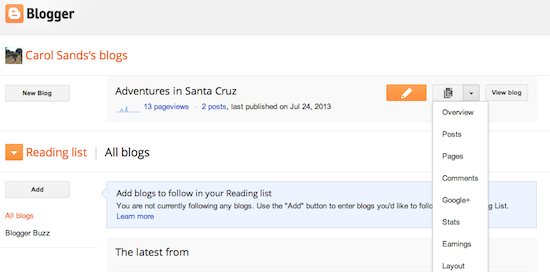
Your Dashboard, as always, is your starting point. This is where all your blogs are listed, and you can click on the icons next to them to perform various actions on each blog, such as:
  • Writing a new post: Just click on the orange Pencil icon on your Dashboard to access the Post Editor.
  • Viewing your posts: The gray Post List icon will take you to a list of your published and drafted posts for a specific blog.
  • Catching up on your favorite blogs: Below the list of your own blogs, you’ll see a list of the blogs you follow with an excerpt from their latest posts.
  • Everything else: Check out the drop-down menu next to the Post List icon for a quick link to:
    • Overview
    • Posts
    • Pages
    • Comments
    • Stats
    • Earnings
    • Layout
    • Template
    • Settings
Note that the Earnings tab will only show if AdSense supports your language.

Overview

Overview
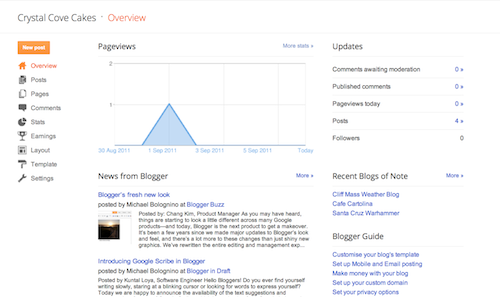
On the Overview tab, you can see your blog’s activity, news and tips from the Blogger team, and recent Blogs of Note.

Write your post

Once you've signed in to Blogger, you'll see your dashboard with your list of blogs. Here's what you need to do:
  1. Click the orange pencil icon to write a new post, and enter anything you want to share with the world.
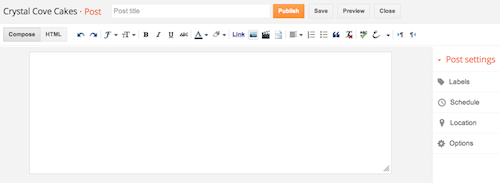
  2. Next, you'll see the Post Editor page. Start by giving your post a title (optional), then enter the post itself:
    New post
  3. When you're done, click the Preview button at the top to make sure it's ready to go, and then click the Publish button to publish your post.

Add an image

You can add an image from your computer or the Web to your blog. Click the image icon in the Post Editor toolbar. A window appears prompting you to browse for an image file on your computer, or enter the URL of an image on the Web.
Once you've selected your image, you can then choose a layout to determine how your image will appear in your post:
  • The 'Left', 'Center', and 'Right' options allow you to customize the way your blog text will flow around your image.
  • The 'Image size' options will determine how large the image will appear within your post.
Click UPLOAD IMAGES to add your image, and then click DONE when the notification window appears telling you that 'Your image has been added.' Blogger will then return you to the post editor, where you'll see your image ready to be published to your blog.
You can also publish images to your blog using your mobile device, Google's free photo software Picasa, or a third-party service like flickr.

Add a video

To add a video to your blog post, click the film strip icon in the Post Editor toolbar above where you compose your blog text. A window appears prompting you to 'Add a video to your blog post.'
Click Browse to select the video file from your computer that you'd like to upload. Note that Blogger accepts AVI, MPEG, QuickTime, Real and Windows Media files and that your video must be less than 100MB in size.
Before uploading your video, add a title in the 'Video Title' box and agree to the Terms and Conditions (you'll only have to do this the first time that you upload a video with Blogger). Then click UPLOAD VIDEO.
While your video uploads, you'll see a placeholder in the post editor showing where your video will appear. You'll also see a status message below the post editor letting you know that your upload is in progress. Depending on the size of your video, this usually takes about five minutes. When it is complete, your video will appear in the post editor.

Customize

Your template is a fun way to customize your blog. When creating a new blog, you're first asked to choose a default template, this is the basic design of your blog. You can choose from many templates for your blog; simply pick the one that best fits your needs.
Template"
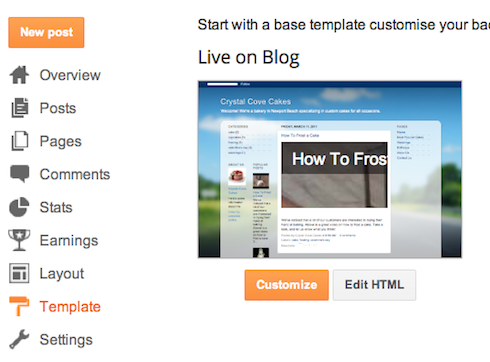
Once on the Template tab, you can either click on the orange Customize button to get started with our easy-to-use WYSIWYG (“What you see is what you get”) template designer, or choose one of our many default templates. If you’d like to edit the HTML of your blog, just click the gray Edit HTML button.
In addition, you can customize your blog's design using our intuitive drag-and-drop interface. You can also add powerful gadgets such as slideshows, user polls, or even AdSense ads. If you want more precise control over your blog's layout, you can also use the Edit HTML feature. To edit your blog's layout, follow these steps:

  1. Click Layout from the drop-down menu on your dashboard below the blog you would like to customize.
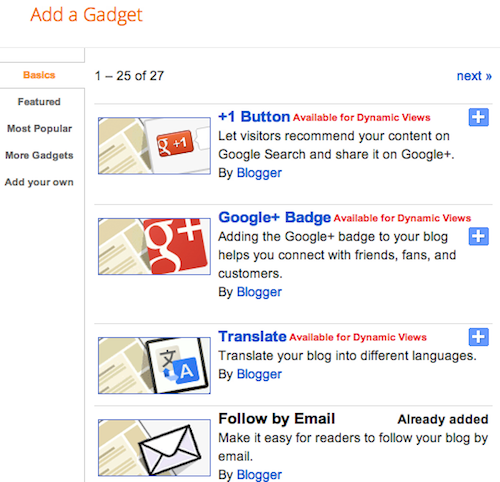
  2. From there, click Edit to edit existing gadgets, or Add a Gadget to add new ones.
  3. To add a new gadget after you've clicked Add a Gadget, simply click the plus sign next to your desired gadget. You can choose from gadgets by category, or search for a specific gadget in the top right of the pop-up window.
add_gadget
  1.  
  2. Once you've added the necessary information to your selected gadget, click the orange Save arrangement button. Your layout changes will appear instantly.
  3.  

Privacy and permissions

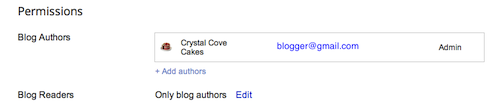
By default, your blog is completely public, and can be read by anyone on the internet. However, if you want to keep it private, you can do that, too. You can change these settings on the Settings | Basic tab.
Permissions and Privacy
  1. Under the 'Blog Readers' section, you'll probably see 'Anybody' selected as the default. When you change this to 'Only these readers,' you'll get an Add Readers button.
  2. Click the Add Readers button and then enter the email address of a person to whom you'd like to grant access to your blog. To add multiple people, separate their addresses with commas.
  3. For each address entered, the Google Account associated with that address will be given access to view your blog. If an address is not associated with an account, that person will receive an invitation email with a link allowing them do one of three things:
    • Sign in to an existing account.
    • Create a new account.